
Guides
Game Vault Login: Username, Password and Account Access
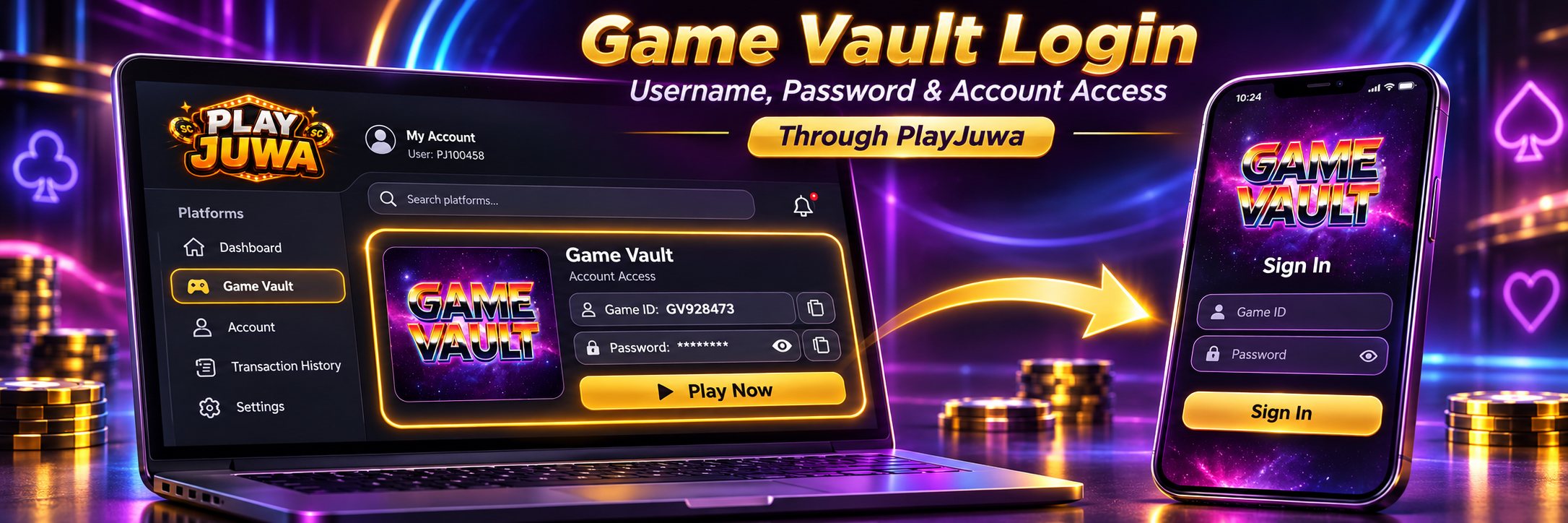
Your Game Vault login is separate from your PlayJuwa login. If you play through PlayJuwa, your Game Vault Game ID and password are shown on the Game Vault card in your PlayJuwa account, and you use those details to sign in to the Game Vault app.
Search results for “Game Vault login” may also show a back-office Backend login. That page isn’t the player login route used through PlayJuwa.
Quick answer: Sign in to PlayJuwa, open the Game Vault card, and copy the Game ID and password shown there. Select Play Now to open the Game Vault download page, get the Game Vault app from there, and sign in to the app with the Game ID and password from your card. Don’t use your PlayJuwa email and password, and don’t use the Game Vault backend page.
PlayJuwa Login vs Game Vault Login
| Login | What it opens | Details you use |
| PlayJuwa | Your PlayJuwa account, wallet and game cards | Your email or phone number and PlayJuwa password |
| Game Vault | The Game Vault app | The Game ID and password shown on your Game Vault card |
Signing in to one doesn’t sign you in to the other.
Your PlayJuwa password won’t open Game Vault.
Where Do You Find Your Game Vault Username and Password?
Your Game Vault details are shown on the Game Vault card inside your PlayJuwa account.
- Sign in to PlayJuwa.
- Open Platforms and type “vault” in the search box.
- Open the Game Vault card.
- Find the Game ID and Password.
- Use the eye icon to reveal the password and the copy buttons to copy each detail.
The Game ID and password on the card are the Game Vault details issued through your PlayJuwa account.
Use them when the Game Vault app asks you to sign in.
For broader information about the platform, see Game Vault on PlayJuwa.
How to Log In to Game Vault Through PlayJuwa
- Sign in to PlayJuwa and open the Game Vault card.
- Copy the Game ID and password.
- Select Play Now. This currently opens the Game Vault download page at download.gamevault999.com.
- Get the Game Vault app from that page if you don’t already have it.
- Open the Game Vault app.
- Enter the Game ID and password from your PlayJuwa card.
- Sign in.
Copying and pasting your details helps reduce typing errors, including accidental spaces or confusion between similar-looking characters.
Can You Log In to Game Vault in a Browser?
Not through PlayJuwa’s current route.
The page opened by Play Now provides the Game Vault app download rather than a browser version of the game. You then sign in inside the Game Vault app.
Game Vault’s current FAQ also says the platform is mobile-only and does not offer a web version. Game Vault FAQ
Player Login vs Game Vault Backend Login
Search results for “Game Vault login” may show a page titled Backend at agent.gamevault999.com.
That page is a back-office portal, not the player login route used through PlayJuwa.
If you reach a backend page, don’t enter your Game ID and password there.
Instead:
- Return to PlayJuwa.
- Open the Game Vault card.
- Select Play Now.
- Follow the Game Vault app route opened from your card.
Is Game Vault Login the Same as Game Vault 999 Login?
“Game Vault 999” and “GV999” are common names associated with Game Vault, and the download page currently opened through PlayJuwa uses the gamevault999.com domain.
However, many websites use similar “999” terminology.
A similar name or domain doesn’t prove that two websites, apps or account systems share the same credentials.
If you use Game Vault through PlayJuwa, use the Game ID and password shown on your Game Vault card and the app route opened through Play Now.
What About Game Vault 777 Login?
Some websites use names such as Game Vault 777 or similar branding with their own web addresses.
Don’t assume a 777-branded site uses the same account system as the Game Vault credentials issued through PlayJuwa.
Use the route shown on your Game Vault card instead.
Are the Game Vault 999 Apps on Google Play the Same?
Don’t assume so.
Google Play contains apps using Game Vault 999-style names.
For example, one current Game Vault 999 Casino listing on Google Play describes itself as entertainment-only and states that it does not offer real-money gambling or real-world prizes.
That does not establish a connection to the Game Vault details issued through your PlayJuwa account.
If you use PlayJuwa, start with the Game Vault card rather than choosing a similarly named app from an app-store search.
Why Is My Game Vault Login Not Working?
Work through these checks in order.
1. Check Your Game Vault Details
Use the Game ID and password from the Game Vault card.
Don’t use your PlayJuwa email address or PlayJuwa password.
2. Copy the Credentials Again
Use the copy buttons on the Game Vault card.
Check for extra spaces, capitalization mistakes or other typing errors.
3. Make Sure You’re Using the Right App or Page
Use the Game Vault app reached through the page opened by your PlayJuwa card.
Don’t try to sign in through:
- a backend page
- a Game Vault 777-branded website
- an unrelated app-store listing
- a forwarded download link
4. Check Whether Your Password Changed
If you reset your Game Vault password, use the current password shown on the card.
5. Restart the App
Close the Game Vault app completely, reopen it and sign in again.
If it still doesn’t work, contact PlayJuwa through live chat, email support@playjuwa.com, or use the PlayJuwa Help Center.
Include the exact error message and your device details, but never send your password.
What If You Forgot Your Game Vault Password?
Open the Game Vault card in your PlayJuwa account.
The current password is shown there, and you can use the eye icon to reveal it.
If you need a new password, select Reset password? on the card.
If that doesn’t resolve the issue, contact PlayJuwa support.
Don’t use password-reset pages or people found through search results, messages or social media to recover PlayJuwa-issued Game Vault details.
What If Your Game Vault Username Is Missing?
Your Game Vault details should appear on the Game Vault card in your PlayJuwa account.
If they aren’t visible:
- Make sure you’re signed in to the correct PlayJuwa account.
- Open Platforms and search for “vault.”
- Open the Game Vault card.
- Follow any options currently shown on the card.
- Reload the page or sign out and sign back in.
If the Game ID still doesn’t appear, contact PlayJuwa support.
Don’t substitute login details from another website, social-media account or unknown person.
Why Am I Seeing a Captcha or Backend Login?
You may have reached the Game Vault backend portal instead of the player route.
This can happen when you open a search result rather than starting from the Game Vault card in your PlayJuwa account.
Close the page, return to PlayJuwa and open Game Vault through Play Now on your card.
How to Avoid Fake or Wrong Game Vault Login Pages
Use these checks before entering credentials:
- Start from your PlayJuwa account rather than a search result or forwarded link.
- Don’t enter your Game ID or password on a backend or admin page.
- Don’t assume “999,” “777” or “official” in a domain name proves who operates a site.
- Never enter your PlayJuwa password into the Game Vault app.
- Never share your Game ID, password or one-time codes through social media or messages.
- Don’t pay someone for login credentials, account “unlocks” or password resets.
If you’re unsure which route to use, start from the PlayJuwa Help Center.
Does a Working Game Vault Login Mean You’re Eligible?
No.
A working Game Vault login doesn’t change PlayJuwa’s eligibility requirements.
You must be at least 18, or older where applicable law requires a higher minimum age, and you must be in an eligible location.
You also can’t use a VPN, proxy or location-spoofing method to bypass geographic restrictions.
See the current PlayJuwa Terms and Conditions for eligibility and location requirements.
Frequently Asked Questions About Game Vault Login
How Do I Log In to Game Vault Through PlayJuwa?
Sign in to PlayJuwa, open the Game Vault card and copy the Game ID and password.
Select Play Now, get the Game Vault app from the page that opens, and sign in to the app using those details.
Is My PlayJuwa Password the Same as My Game Vault Password?
No.
Your PlayJuwa password opens your PlayJuwa account.
Your Game Vault password is a separate credential shown on the Game Vault card.
Where Do I Find My Game Vault Username?
The Game Vault card in your PlayJuwa account shows your Game ID.
Use the Game ID and password shown on the card when the Game Vault app asks you to sign in.
What Is Game Vault 999 Login?
“Game Vault 999” is a common name associated with Game Vault.
PlayJuwa’s current Game Vault route opens a gamevault999.com download page, but other similarly named websites may use different account systems.
Is Game Vault 777 Login the Same as Game Vault 999?
Don’t assume so.
Use the Game ID, password and route provided through your own PlayJuwa Game Vault card.
Why Is My Game Vault Login Not Working?
Common causes include using your PlayJuwa credentials instead of your Game Vault details, typing errors, an outdated password, or attempting to sign in through a backend page or unrelated app.
Copy the current details again and use the Game Vault app route opened through your card.
How Do I Reset My Game Vault Password?
Select Reset password? on the Game Vault card inside your PlayJuwa account.
If that doesn’t help, contact PlayJuwa support.
Is the Game Vault Backend Login for Players?
No.
It is a back-office portal, not the player login route used through PlayJuwa.
Players using PlayJuwa sign in through the Game Vault app route opened from their Game Vault card.
Can I Log In to Game Vault in a Browser?
Not through PlayJuwa’s current route.
Play Now opens the Game Vault download page, and the player login happens inside the Game Vault app.
Where Should I Download Game Vault?
Use the page opened by Play Now on your Game Vault card rather than choosing a similarly named app or download page from search results.
Summary
Your Game Vault login is separate from your PlayJuwa login.
Sign in to PlayJuwa, open the Game Vault card and copy the Game ID and password. Select Play Now to reach the current Game Vault download page, then sign in to the Game Vault app with the details shown on your card.
Don’t use the Game Vault backend page for player login. If you have password or access problems, use Reset password? on the Game Vault card or contact PlayJuwa support.
For broader information about the platform, see Game Vault on PlayJuwa or the guide to fish table games.
No purchase necessary. 18+ only. Void where prohibited. Play for entertainment and within your limits. Terms and Conditions apply.