
Guides
RiverSweeps Sign Up: How to Create an Account and Get Access
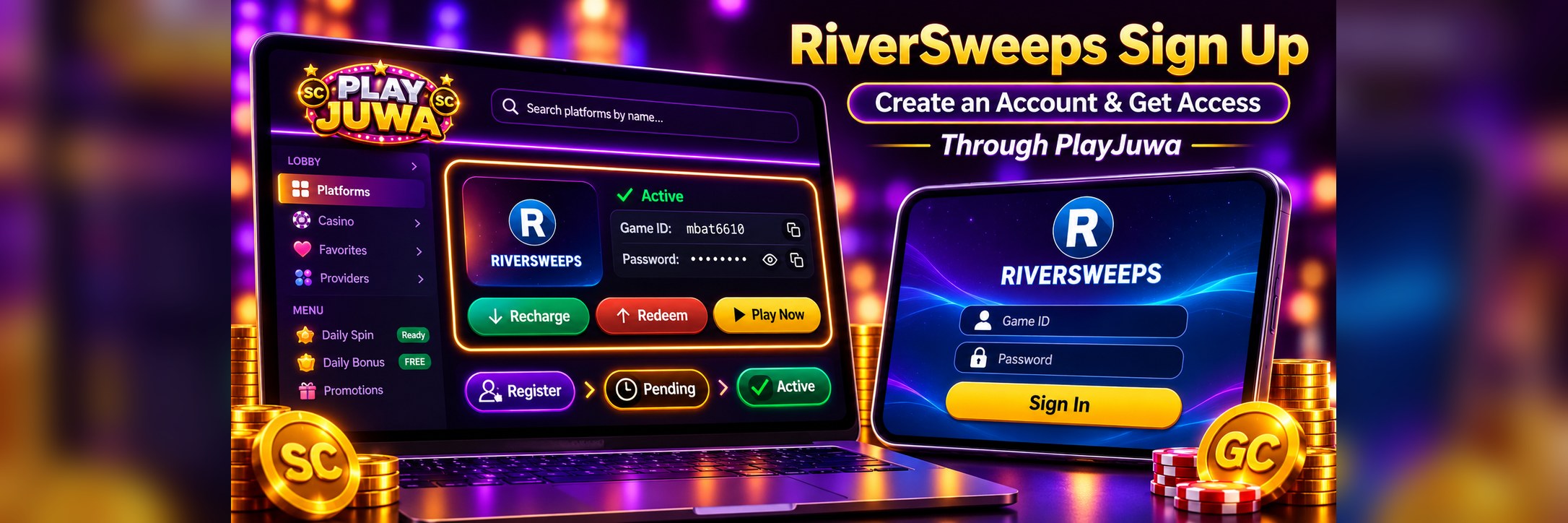
There's no single RiverSweeps sign-up page that works for everyone. RiverSweeps (also called RiverSweeps 777 or Rsweeps) is a sweepstakes gaming system, and players get accounts through the site or provider they use it with. Each provider has its own steps. On PlayJuwa, sign-up happens inside your PlayJuwa account: you register on the RiverSweeps card, and your RiverSweeps Game ID and password appear on that card.
Quick answer: To sign up for RiverSweeps through PlayJuwa, create a PlayJuwa account, sign in, and find the RiverSweeps card in your lobby. Select Register on the card. Your RiverSweeps Game ID and password then appear on the card, either right away or after a short Pending stage while your request is processed. Select Play Now to open RiverSweeps in your browser and sign in with those details. You don't need a PIN, an agent, or an app.
How Does RiverSweeps Sign Up Work?
It depends on where you play. The official RiverSweeps website doesn't have a public sign-up form for players. RiverSweeps is distributed through third-party providers, so account-creation steps can vary depending on the provider you use.
That's why sign-up steps you read on one site won't work on another. If you use PlayJuwa, follow the PlayJuwa steps below and ignore instructions written for other providers.
How to Sign Up for RiverSweeps Through PlayJuwa
- Create a PlayJuwa account. Go to the PlayJuwa sign-up page and use the options shown there. Your password needs at least 8 characters, with an uppercase letter, a lowercase letter, a number, and a special character.
- Sign in. Use your email address or 10-digit phone number and your password. Your lobby opens after you sign in.
- Find the RiverSweeps card. It's listed with your other platforms under Platforms. The quickest way is to type "river" in the platform search box.
- Select Register. The card has a Register button for creating a new RiverSweeps account. Registering doesn't involve a payment step.
- Wait if the card shows Pending. Some accounts are ready right away. Others show Request submitted with a message that your request is being worked on and your credentials will appear on the card when ready. RiverSweeps requests on PlayJuwa are handled manually, so a short wait is normal.
- Find your Game ID and password. Once the card shows Active, it displays your RiverSweeps Game ID and password. Use the copy buttons to avoid typing mistakes, and the eye icon if you need to see the password.
- Select Play Now. RiverSweeps opens in your browser. Sign in with the Game ID and password from your card.
If you don't see the RiverSweeps card, or it stays Pending longer than you expect, use the PlayJuwa Help Center, contact PlayJuwa support, use live chat, or email support@playjuwa.com.
Is Your PlayJuwa Account the Same as a RiverSweeps Account?
No. They're two separate logins:
| Login | What it's for | Where it comes from |
| PlayJuwa email or phone number and password | Your PlayJuwa account, wallet, and game cards | You create it when you sign up for PlayJuwa |
| RiverSweeps Game ID and password | Signing in to RiverSweeps | Shown on the RiverSweeps card after you register |
Your PlayJuwa password won't open RiverSweeps, and your RiverSweeps password won't open PlayJuwa. Keep both private and store them separately.
Can You Sign Up Directly on the RiverSweeps Website?
Not as a player. The RiverSweeps website offers its games, app download links, and support contacts, plus a separate contact for distributors. It doesn't offer a player sign-up form.
Some other websites use the RiverSweeps name with "Register Now" forms. A page that looks official isn't necessarily connected to RiverSweeps or to your provider. Don't enter personal details on a page you can't verify. If you play through PlayJuwa, you don't need any outside sign-up page.
Does RiverSweeps Use a PIN?
You may see "RiverSweeps PIN" on third-party pages, because login details differ from provider to provider. PlayJuwa doesn't use a PIN. Your RiverSweeps card shows a Game ID and a password, and those are the details you use to sign in.
Never buy a PIN, use a "PIN generator," or accept login details from someone on social media.
What Happens After Your RiverSweeps Account Is Active?
Once your RiverSweeps card shows Active, here's how coins work with it on PlayJuwa:
| Step | How it works on PlayJuwa |
| Free coins | The free-entry offer gives eligible new accounts 2 free Sweepstakes Coins and 10,000 Gold Coins after account verification. No purchase is needed. |
| Optional coin packages | You can buy a package from Buy SC. Packages currently start at $10.99 for 11 Sweepstakes Coins and 20,000 Gold Coins. The checkout shows the payment methods currently available. |
| Moving coins into RiverSweeps | Select Recharge on the card to move Sweepstakes Coins from your PlayJuwa wallet into RiverSweeps. The current minimum is 5 SC. |
| Moving coins back | Select Redeem on the card and enter an amount within the limit shown. Your request is submitted for processing, and the SC is added to your PlayJuwa wallet once it's approved. |
Buying coins is optional and doesn't improve your chances of winning. Only an eligible Redeemable Sweepstakes Coin balance may qualify for prize redemption. See Gold Coins vs Sweepstakes Coins for how each coin works.
Already Have a RiverSweeps Account?
If your RiverSweeps details came from PlayJuwa, don't register again. Sign in with the Game ID and password on your card.
If you have a RiverSweeps account from somewhere else, contact PlayJuwa support before registering. If your RiverSweeps card shows a Connect Your Account option, follow the fields shown there or contact PlayJuwa support before linking an existing account. Don't create extra accounts to get around a problem: PlayJuwa's Terms and Conditions allow only one PlayJuwa account per person.
Where Do You Play RiverSweeps After Signing Up?
In your browser. Select Play Now on the RiverSweeps card. This currently opens RiverSweeps' web play page at river777.net. The game loads in the browser, and then you sign in with your Game ID and password.
To get back quickly next time, add a home-screen shortcut to playjuwa.com and open RiverSweeps from the card. That way you always use the current Play Now link.
Do You Need to Download a RiverSweeps App?
No, not for the PlayJuwa route. PlayJuwa provides RiverSweeps access through the browser on phones, tablets, and computers, and it doesn't publish a RiverSweeps app. The RiverSweeps website has its own app download area, but PlayJuwa players don't need it. Never install an APK sent to you by a stranger or posted on social media.
For the current PlayJuwa browser route and platform details, see the RiverSweeps game page on PlayJuwa.
Is There a RiverSweeps Sign-Up Bonus?
PlayJuwa doesn't offer a RiverSweeps-specific sign-up bonus. Eligible new PlayJuwa accounts get the free-entry offer of 2 free Sweepstakes Coins and 10,000 Gold Coins after account verification, with no purchase needed. Offers that other sites advertise for RiverSweeps, such as "$10 free play," belong to those sites.
See RiverSweeps $10 Free Play: What's Actually Available for details.
Why Can't I Sign Up for RiverSweeps?
You're Not Signed In
Game cards only appear after you sign in to PlayJuwa.
The RiverSweeps Card Shows Pending
Your request is being processed. Your details will appear on the card when ready.
You Can't Find the RiverSweeps Card
Type "river" in the platform search box, or contact support.
You're Following Another Provider's Steps
Instructions from other sites don't apply to PlayJuwa.
Your PlayJuwa Password Isn't Accepted
Use the forgot-password option on the PlayJuwa login page.
Location or Eligibility Is Blocking Access
PlayJuwa isn't offered in every state. Check the Terms and Conditions, and don't use a VPN or proxy to get around location rules.
If none of these fits, use the PlayJuwa Help Center or contact PlayJuwa support and describe what you see on the RiverSweeps card.
How to Stay Safe When Signing Up for RiverSweeps
- Start from playjuwa.com, not from a search result or a social media message.
- Don't pay anyone for a RiverSweeps account, PIN, or "setup."
- Don't share your Game ID, passwords, or verification codes.
- Only open RiverSweeps from Play Now on your card.
- PlayJuwa is for adults 18 and older who meet any higher minimum age required by law. Signing up doesn't by itself make you eligible to take part. Location and account rules in PlayJuwa Terms still apply.
For guidance on limits, breaks, self-exclusion, and account support, see PlayJuwa Responsible Gaming.
Frequently Asked Questions About RiverSweeps Sign Up
How do I sign up for RiverSweeps?
Through PlayJuwa: create a PlayJuwa account, sign in, select Register on the RiverSweeps card, and use the Game ID and password that appear on the card. Other providers have their own steps.
Can I create a RiverSweeps account online?
Yes, through a provider. RiverSweeps own website doesn't offer player sign-up. On PlayJuwa, you register from the RiverSweeps card in your account.
Does RiverSweeps have an official sign-up page?
Not for players. The RiverSweeps website provides games, app links, and support, while player accounts come through providers such as PlayJuwa.
Do I need a PlayJuwa account to play RiverSweeps on PlayJuwa?
Yes. You register for RiverSweeps from inside your PlayJuwa account.
Is my PlayJuwa login the same as my RiverSweeps login?
No. RiverSweeps uses its own Game ID and password, shown on the RiverSweeps card.
Does RiverSweeps use a PIN?
Not on PlayJuwa. You get a Game ID and password instead.
Why does my RiverSweeps card say Pending?
Your request has been submitted and is being processed. Your Game ID and password will appear on the card when ready.
Do I have to download RiverSweeps after signing up?
No. Select Play Now on the RiverSweeps card and it opens in your browser.
Do I have to buy coins to play RiverSweeps?
No. No purchase is necessary, and eligible new accounts get 2 free Sweepstakes Coins and 10,000 Gold Coins after account verification. Coin packages are optional.
Is there a RiverSweeps sign-up bonus?
Not a RiverSweeps-specific one on PlayJuwa. Eligible new PlayJuwa accounts get the free-entry offer of 2 free Sweepstakes Coins and 10,000 Gold Coins after account verification.
What if RiverSweeps sign-up isn't working?
Make sure you're signed in to PlayJuwa, check whether the card shows Pending, and contact PlayJuwa support if your details don't appear.
Final Takeaway
RiverSweeps doesn't have one sign-up page for every player. Accounts come from the provider you use. On PlayJuwa, you create a PlayJuwa account, select Register on the RiverSweeps card, and get a Game ID and password on that card, sometimes after a short Pending stage. Then you select Play Now to play in your browser. You don't need a PIN, an agent, or an app.
For more about the game system, see the RiverSweeps page on PlayJuwa.
No purchase necessary. 18+ only. Void where prohibited. Play for entertainment and within your limits. Terms and Conditions apply.