

Guides
Fire Kirin Login: Game ID, Password and Account Access
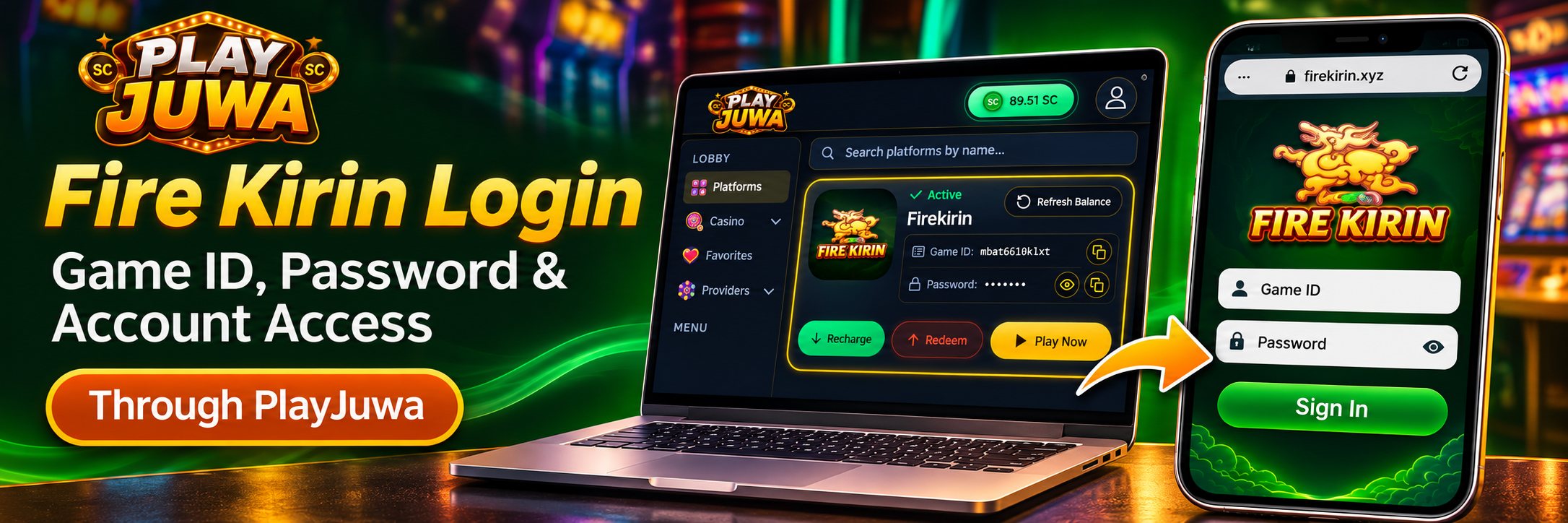
Your Fire Kirin login is separate from your PlayJuwa login. If you play through PlayJuwa, your Fire Kirin Game ID and password are shown on the Firekirin card in your PlayJuwa account.
Open Fire Kirin from that card with Play Now, then sign in using the Game ID and password shown there—not your PlayJuwa email address and password.
Quick answer: Sign in to PlayJuwa, open Platforms and find the Firekirin card. Copy the Game ID and password shown there, then select Play Now to open Fire Kirin in a new tab. When Fire Kirin asks you to sign in, enter the Game ID and password from your card. Your PlayJuwa login details won’t work in Fire Kirin.
Fire Kirin Login vs PlayJuwa Login
These are two separate sign-ins:
| Login | What it opens | Details you use |
| PlayJuwa | Your PlayJuwa account, wallet and game cards | Your email or phone number and PlayJuwa password |
| Fire Kirin | The Fire Kirin game | The Game ID and password shown on your Firekirin card |
Signing in to PlayJuwa does not automatically sign you in to Fire Kirin.
A common login problem is mixing up these two sets of credentials.
Where Do You Find Your Fire Kirin Game ID and Password?
Your Fire Kirin credentials are shown on the Firekirin card inside your PlayJuwa account.
- Sign in to PlayJuwa.
- Open Platforms.
- Type “kirin” in the platform search box.
- Find the card named Firekirin.
- Locate the Game ID and Password.
- Use the copy button next to the Game ID.
- Use the eye icon to reveal the password, then copy it.
PlayJuwa spells the platform name as Firekirin, while people commonly search for it as Fire Kirin.
The Game ID and password shown on the card are the Fire Kirin details issued through your PlayJuwa account.
For broader information about the platform, see Fire Kirin on PlayJuwa or the guide explaining what Fire Kirin is.
How to Log In to Fire Kirin Through PlayJuwa
- Sign in to PlayJuwa.
- Open the Firekirin card.
- Copy the Game ID.
- Reveal and copy the password.
- Select Play Now.
- Fire Kirin opens in a new tab, currently on a firekirin.xyz web address.
- Follow the options shown on the Fire Kirin page.
- When the sign-in screen appears, enter the Game ID and password from your Firekirin card.
Copying and pasting your credentials helps reduce typing errors, including accidental spaces or confusing similar-looking characters such as the letter O and the number 0.
Is Your PlayJuwa Password the Same as Your Fire Kirin Password?
No.
Your PlayJuwa password is used to access your PlayJuwa account.
Your Fire Kirin password is separate and is paired with the Game ID shown on your Firekirin card.
If your browser or phone autofills your PlayJuwa password on a Fire Kirin sign-in screen, clear it and paste the password from the Firekirin card instead.
Why Is My Fire Kirin Login Not Working?
Work through these checks in order.
Check the Credentials
Use the Game ID and password from the Firekirin card.
Do not enter your PlayJuwa email address or PlayJuwa password.
Make Sure You Used the Correct Card
Check that you copied the details from the Firekirin card rather than another platform.
Copy the Details Again
Copy and paste the credentials again and check for:
- extra spaces
- differences in capitalization
- characters that may have been mistyped
Open the Correct Fire Kirin Page
Open Fire Kirin through Play Now on your PlayJuwa card.
Avoid using an old bookmark, a search result or a link forwarded by someone else.
Check Whether the Password Changed
If you updated the Fire Kirin password, use the current password shown on the card.
Start a Fresh Session
Close the Fire Kirin tab and reopen it through Play Now.
If necessary, sign out of PlayJuwa and sign back in before trying again.
If the problem continues, contact PlayJuwa through live chat, email support@playjuwa.com, or use the PlayJuwa Help Center.
Include the exact error message and your device/browser details, but never send your password.
Are You Using the Right Fire Kirin Login Page?
Search results for Fire Kirin login can show several Fire Kirin-branded web addresses, including different .xyz pages and other domains.
A similar Fire Kirin name or domain does not prove that a page uses the same account system as the credentials issued through PlayJuwa.
If you use Fire Kirin through PlayJuwa, open the game through Play Now on your Firekirin card instead of choosing a login address from search results.
Is firekirin.xyz the Official Fire Kirin Login?
Don’t assume one Fire Kirin address works for every account.
PlayJuwa’s current Play Now route opens a firekirin.xyz page, but other Fire Kirin-branded .xyz pages and domains also appear online.
If your Fire Kirin access was issued through PlayJuwa, use the route opened by your Firekirin card.
What Is Fire Kirin 777 Login?
Fire Kirin 777 is a common search and naming variation associated with Fire Kirin.
Some Fire Kirin web addresses also contain firekirin777.
PlayJuwa does not list Fire Kirin 777 as a separate platform.
If you use PlayJuwa, use the Game ID, password and Play Now route from your Firekirin card rather than assuming another 777-branded page uses the same account.
Player Login vs Fire Kirin Back-Office Login
Some Fire Kirin-related search results can lead to back-office or operator login pages.
Those are different from normal player access.
If a page asks for operator, administrative or back-office credentials, close it and reopen Fire Kirin through Play Now on your PlayJuwa card.
What If You Forgot Your Fire Kirin Password?
Open the Firekirin card in your PlayJuwa account.
The current password is shown on the card, and you can use the eye icon to reveal it.
If you need a new password, select Update password? on the Firekirin card.
If that does not resolve the problem, contact PlayJuwa support.
Avoid password-reset pages or people found through search results, social media or unsolicited messages.
What If Your Fire Kirin Game ID Is Missing?
Try these checks:
- Make sure you are signed in to the correct PlayJuwa account.
- Open Platforms and search for “kirin.”
- Open the Firekirin card.
- Check the status displayed on the card.
- Reload the page.
- Sign out of PlayJuwa and sign back in.
If the Game ID still does not appear, contact PlayJuwa support.
Do not substitute a Game ID from another website, buy a login or borrow someone else’s account details.
Fire Kirin Login Page Won’t Load?
A page that does not load is different from a login screen that rejects your credentials.
Try these steps:
- Return to PlayJuwa.
- Select Play Now on the Firekirin card again.
- Because Play Now opens a new tab, check that your browser is not blocking the new tab.
- Check your internet connection.
- Try switching between Wi-Fi and mobile data.
- Reload the page once.
- Close duplicate Fire Kirin tabs.
- Try another current browser if necessary.
If the page still does not load, contact PlayJuwa support rather than searching for another Fire Kirin login address.
Can You Log In to Fire Kirin on Mobile?
Yes.
Sign in to PlayJuwa on your phone, open the Firekirin card and select Play Now.
Use the access option shown on the Fire Kirin page for your device, then sign in using the Game ID and password from your PlayJuwa card.
For more general mobile/game information, see the Fire Kirin free play guide.
How to Avoid Fake or Wrong Fire Kirin Login Pages
Use these checks before entering your credentials:
- Start from your PlayJuwa account rather than a search result, advertisement or forwarded link.
- Don’t assume official, .xyz or 777 in a web address proves who operates the page.
- Never enter your PlayJuwa password on a Fire Kirin login screen.
- Never share your Game ID, password or one-time codes through messages or social media.
- Don’t pay someone for login details, account “unlocks” or password changes.
- Don’t install a different app simply because your login fails.
If you entered your Fire Kirin Game ID or password on a suspicious page, select Update password? on the Firekirin card and contact PlayJuwa support.
If you also entered your PlayJuwa password, change your PlayJuwa password as well.
Does a Working Fire Kirin Login Mean You’re Eligible?
No.
A working Fire Kirin login does not change PlayJuwa’s eligibility requirements.
You must be at least 18, or older where applicable law requires a higher minimum age, and you must be in an eligible location.
You also cannot use a VPN, proxy or location-spoofing method to bypass geographic restrictions.
See the current PlayJuwa Terms and Conditions for eligibility and location requirements.
Frequently Asked Questions About Fire Kirin Login
How Do I Log In to Fire Kirin Through PlayJuwa?
Sign in to PlayJuwa, open the Firekirin card and copy the Game ID and password.
Select Play Now, then enter those details when Fire Kirin asks you to sign in.
Where Do I Find My Fire Kirin Game ID?
The Game ID is shown on the Firekirin card inside your PlayJuwa account.
A copy button appears beside it.
Is My PlayJuwa Password the Same as My Fire Kirin Password?
No.
Your PlayJuwa password opens your PlayJuwa account.
Your Fire Kirin password is a separate credential shown on the Firekirin card.
Why Is My Fire Kirin Login Not Working?
Common causes include using your PlayJuwa details, copying credentials from the wrong card, typing errors, using an old link or using an outdated password.
Copy the current details again and open Fire Kirin through Play Now on your card.
What If I Forgot My Fire Kirin Password?
The current password is shown on your Firekirin card.
To set a new one, select Update password? on the card.
If that does not resolve the issue, contact PlayJuwa support.
Is firekirin.xyz the Official Fire Kirin Login?
Don’t assume one address works for every account.
If you use Fire Kirin through PlayJuwa, use the page opened through Play Now on your Firekirin card.
What Is Fire Kirin 777 Login?
It is a common naming variation associated with Fire Kirin.
PlayJuwa does not list Fire Kirin 777 as a separate game, so use the details and Play Now route from your Firekirin card.
Can I Log In to Fire Kirin on My Phone?
Yes.
Sign in to PlayJuwa on your phone, open the Firekirin card, select Play Now, and use the Game ID and password shown on your card.
Summary
Your Fire Kirin login is separate from your PlayJuwa login.
Sign in to PlayJuwa, open the Firekirin card and copy the Game ID and password. Select Play Now, then enter those details when Fire Kirin asks you to sign in.
If you have login problems, verify that you are using the correct credentials and current Play Now route. If needed, use Update password? on the Firekirin card or contact PlayJuwa support.
Avoid entering PlayJuwa-issued Fire Kirin credentials on login pages found through unrelated search results.
For more information, see Fire Kirin on PlayJuwa, What Is Fire Kirin?, or the Fire Kirin free play guide.
No purchase necessary. 18+ only. Void where prohibited. Play for entertainment and within your limits. Terms and Conditions apply.